Workerline Enhancements
1. Executive Summary
Workerline is a PWA-based anonymous wellbeing and feedback platform used by maritime workers onboard vessels. Workers interact with an AI-driven conversational survey ("Share"), can reach out for support ("Help"), and will soon be able to access educational content ("Learn").
This specification covers a concentrated 2–3 week sprint to deliver enhancements across the user-facing app (scb-q), the API layer (scb-api), and the admin dashboard (scb). Leveraging agentic coding workflows, the originally estimated 5–6 week timeline is compressed into 2–3 weeks at roughly half the originally quoted cost.
Multilingual Chat
EN/DE language toggle + TTS/STT audio
Learn Section
Video, text & audio guides
Help Section
Live video/voice calls + email
Navigation Overhaul
Three-tab layout (Share/Learn/Help)
Escalation System
Auto-triggered by AI risk analysis
Dashboard & CMS
Content management + org settings
2. Product Context
Who Uses Workerline
(scb-q PWA)"] end subgraph "Admin Users" A["🏢 Organization Admin
(scb Dashboard)"] end subgraph "External" C["💚 Support Counselor
(Daily.co / WhatsApp)"] D["📧 DPA
(Email)"] end W -- "anonymous chat,
voice, feedback" --> API["⚡ scb-api"] A -- "manage surveys,
content, cases" --> API API -- "video/voice call" --> C API -- "anonymous email" --> D API -- "SSE real-time" --> W API -- "push notifications" --> A style W fill:#D4FF00,stroke:#333,color:#000 style A fill:#e8e8e8,stroke:#333,color:#000 style C fill:#25D366,stroke:#333,color:#fff style D fill:#f0f0f0,stroke:#333,color:#000 style API fill:#333,stroke:#000,color:#fff
| Actor | App | Description |
|---|---|---|
| Seafarer / Worker | scb-q (PWA) | Anonymous end-user on a vessel. Fingerprint-based identity — no login. |
| Organization Admin | scb (Dashboard) | Manages surveys, analytics, cases, content, escalations. |
| Support Counselor | External | Receives video/voice calls via Daily.co or WhatsApp. |
| DPA | Receives anonymous emails from workers via the Help section. |
3. System Architecture
React 18 · XState · Tailwind
Tabs: Share | Learn | Help"] DASH["🖥️ scb · Dashboard
React · shadcn/ui
Analytics · CMS · Cases"] end subgraph "API Layer" API["⚡ scb-api
Bun · Express · SQLite
Redis pub/sub · Bull queues"] end subgraph "Data" DB[("💾 SQLite")] REDIS[("🔴 Redis")] end subgraph "External Services" OAI["🤖 OpenAI
GPT-4 · TTS · Whisper"] DAILY["📹 Daily.co"] RESEND["📧 Resend"] FP["🔍 FingerprintJS Pro"] end PWA -- "REST + SSE" --> API DASH -- "REST (JWT)" --> API API --> DB API --> REDIS API --> OAI API --> DAILY API --> RESEND API --> FP DAILY -. "WebRTC" .-> PWA style PWA fill:#D4FF00,stroke:#333,color:#000 style DASH fill:#e8e8e8,stroke:#333,color:#000 style API fill:#333,stroke:#000,color:#fff style DB fill:#f0f0f0,stroke:#555,color:#000 style REDIS fill:#DC382D,stroke:#333,color:#fff style OAI fill:#10a37f,stroke:#333,color:#fff style DAILY fill:#1BEBB9,stroke:#333,color:#000 style RESEND fill:#000,stroke:#333,color:#fff style FP fill:#FF6900,stroke:#333,color:#fff
Key Infrastructure
- Database: SQLite via
bun:sqlite(native Bun driver) - Real-time: Redis pub/sub → SSE to clients
- Queue: Bull (Redis-backed) — risk analysis, email, push notifications
- Auth: JWT + refresh tokens, 2FA (dashboard only; PWA is fingerprint-based)
- State (PWA): XState state machine for chat flow, React context for cases/messages
4. Feature Specifications
Eight feature areas spanning the PWA, API, and admin dashboard. Each section includes design references, technical details, and diagrams.
4.1 Share — Chat Interface Enhancements
The Share tab is the existing AI-driven conversational survey. This sprint enhances it with multilingual support, audio capabilities, and UI refinements.
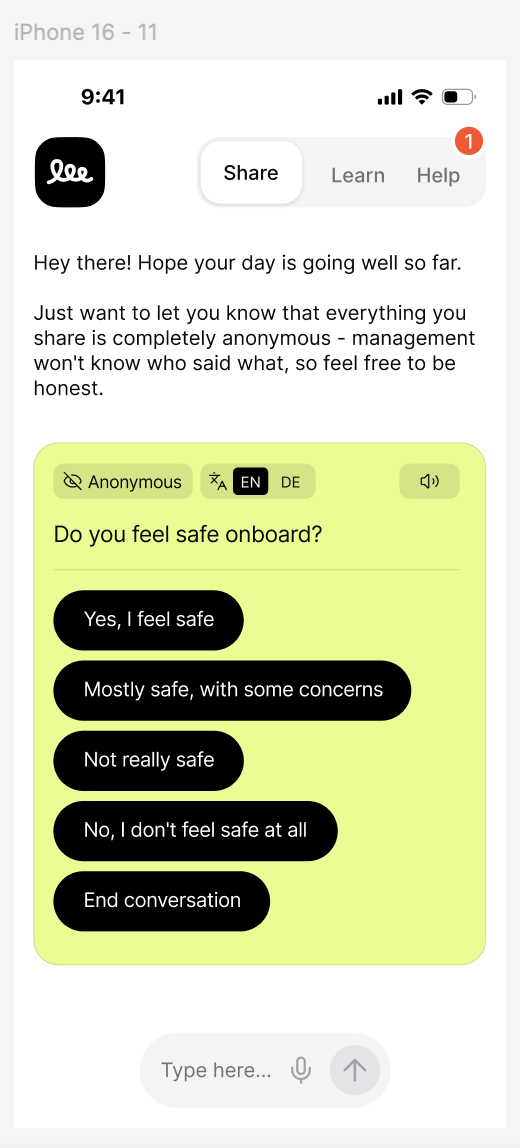
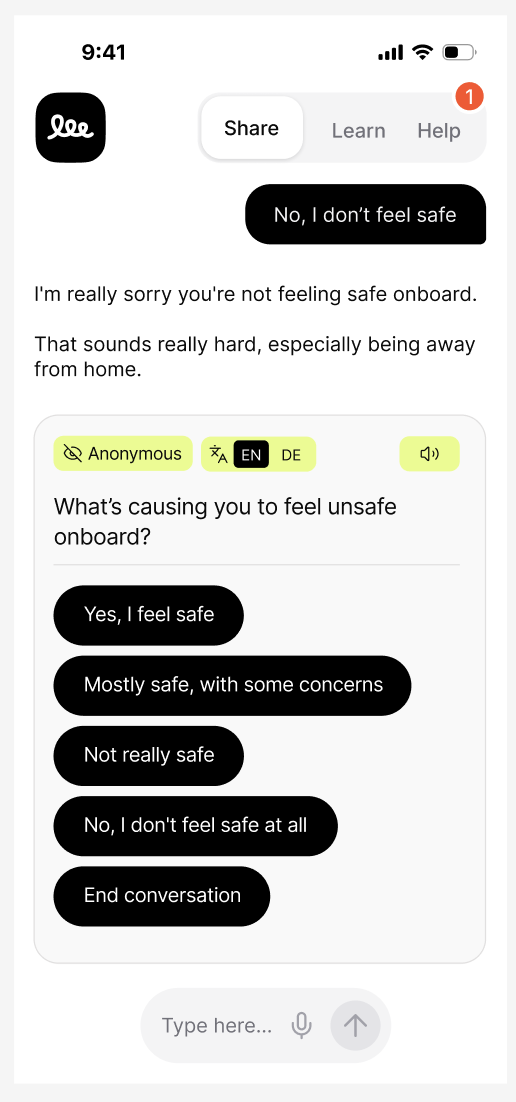
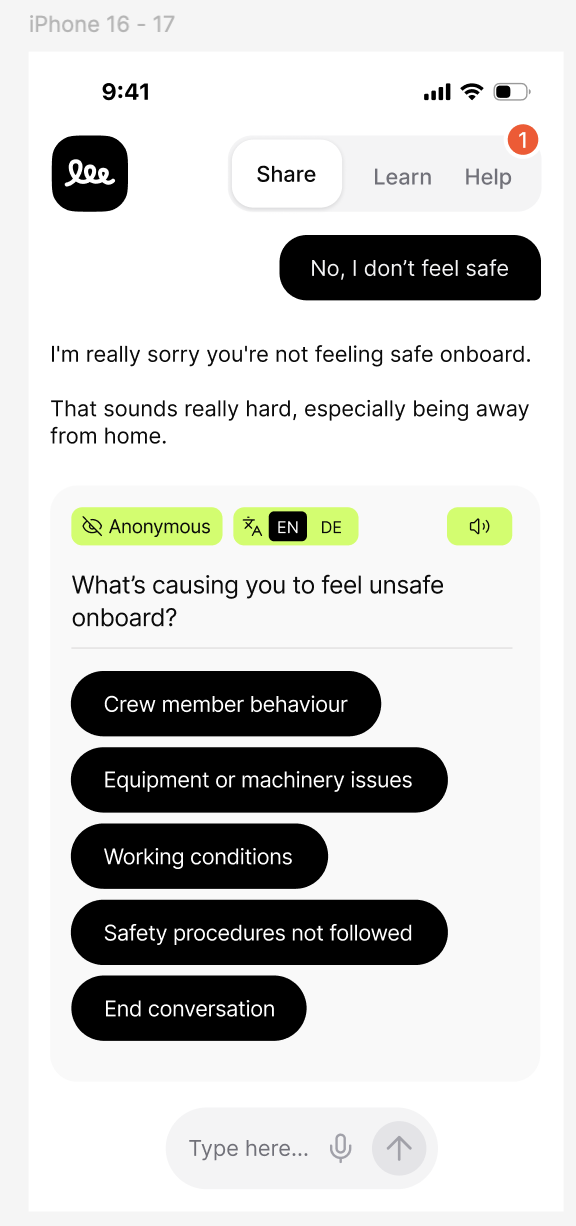
4.1.1 Language Toggle (EN / DE)
An inline EN / DE toggle within each question card allowing the worker to switch between English and German mid-conversation. Toggling re-renders the current question and its answer options in the selected language; previously answered messages remain in their original language. The toggle state persists for the remainder of the session. The selected language is sent with each /complete request via the existing lang field.
Implementation: scb-q — add selectedLang state to App.jsx, render toggle in the question card. scb-api — add a lang === "de" block to getUIMessages() in sessionRepository.ts with German translations for all UI caption keys. Note: "de" for German, not to be confused with existing "da" (Danish).
4.1.2 Text-to-Speech (Play Question)
A speaker icon 🔊 in each question card reads the question aloud via AI-generated speech.
4.1.3 Speech-to-Text (Voice Input)
A microphone icon in the chat input bar enables voice input. Tapping it opens a fullscreen dark overlay.
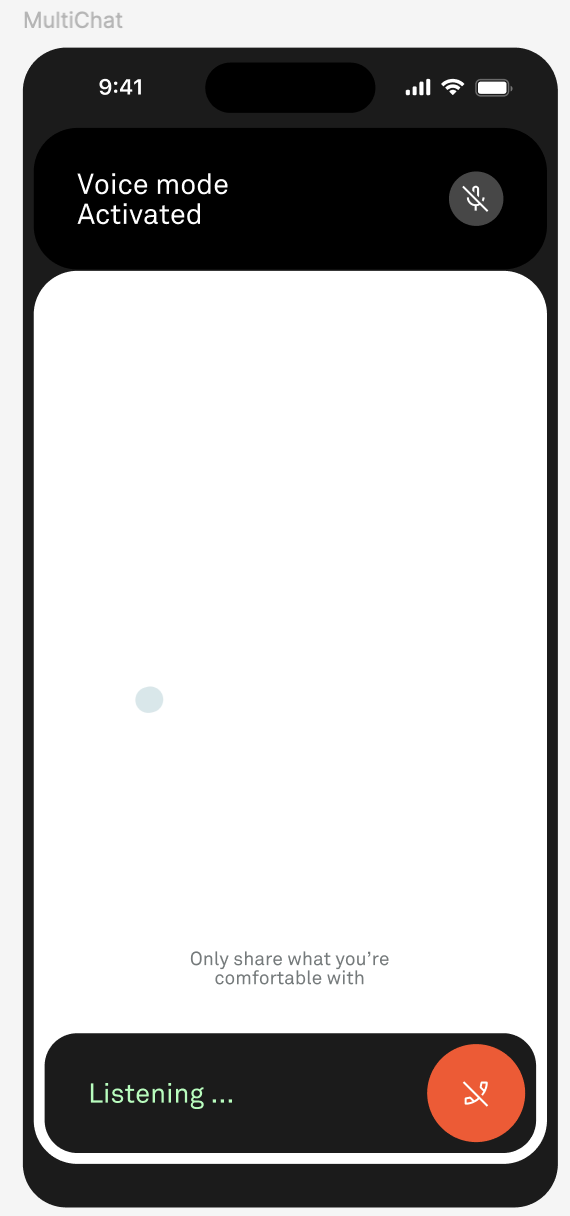
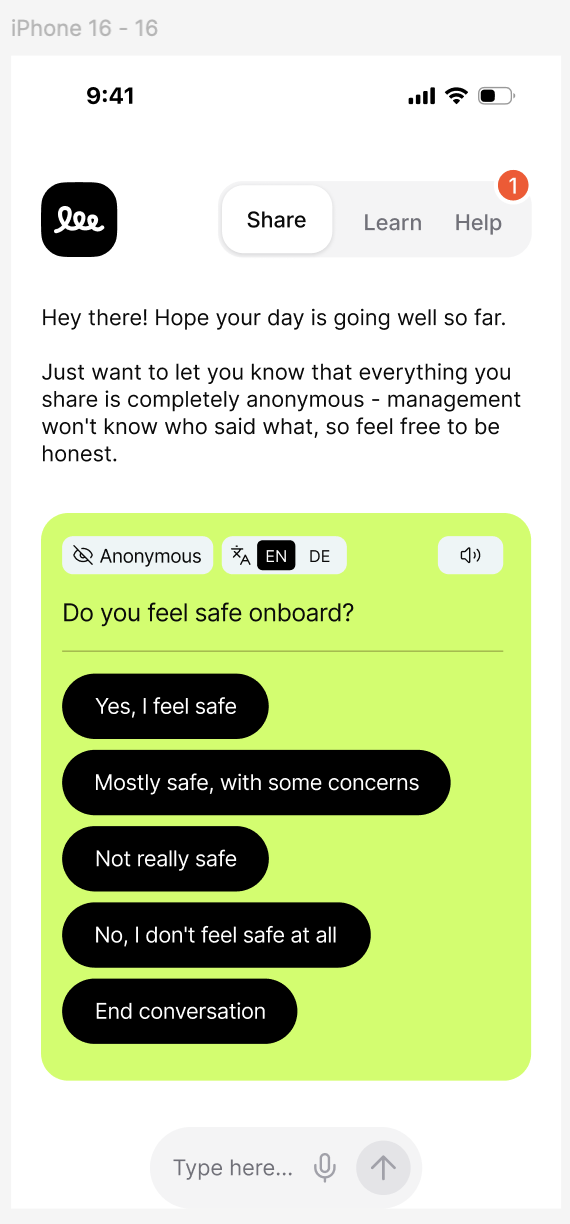
4.1.4 UI Updates — Question Card Styling
- Lime-green (#D4FF00) background on question cards
- "Anonymous" badge with eye-slash icon — always visible
- Dark pill-shaped answer buttons (black bg, white text, rounded-full)
- "End conversation" always last option
- Language toggle + speaker icon embedded in card header
4.1.5 Support Channel Configuration
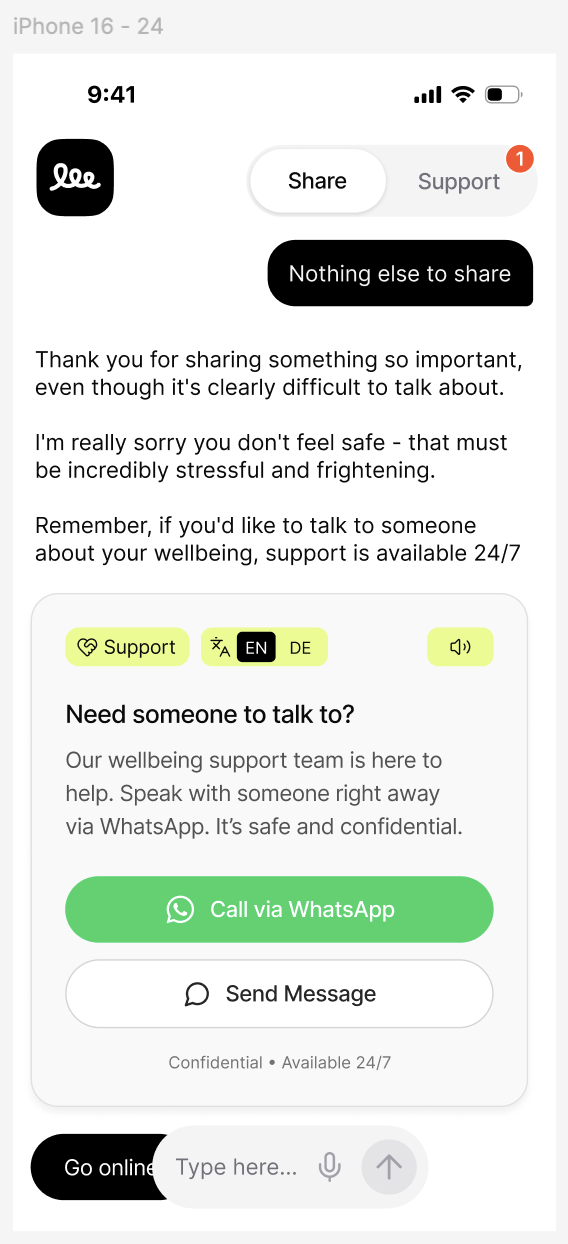
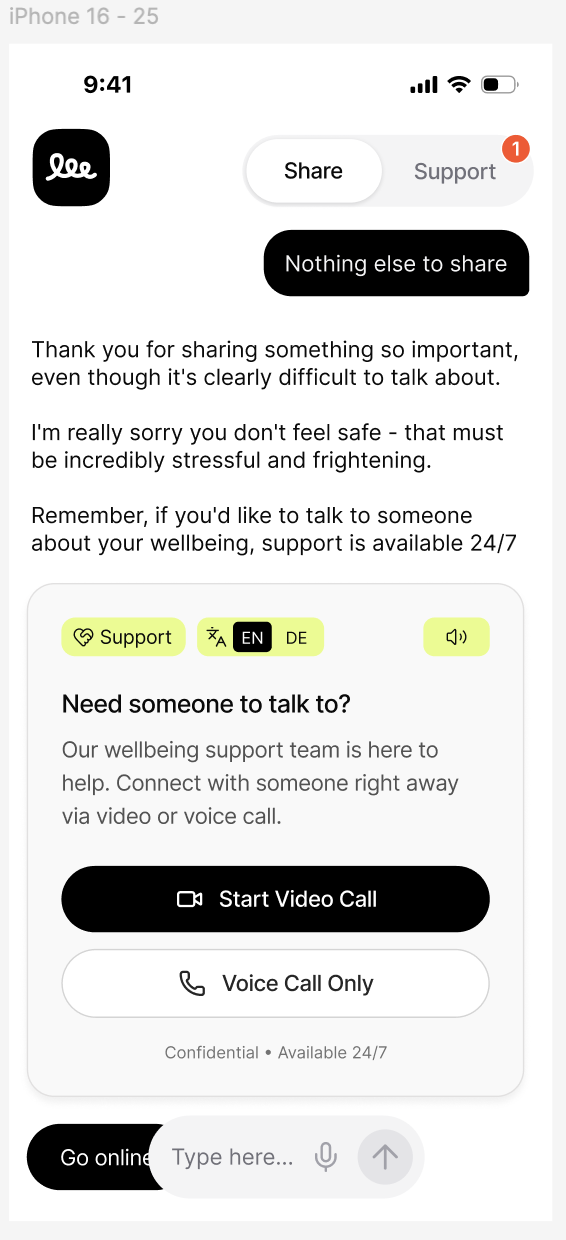
Organizations choose their preferred support channel via dashboard settings. When WhatsApp is enabled, the support card offers WhatsApp-based contact. When video/voice calls are enabled instead, the card offers Daily.co-based calls. This is an organization-level setting — not dependent on network conditions.
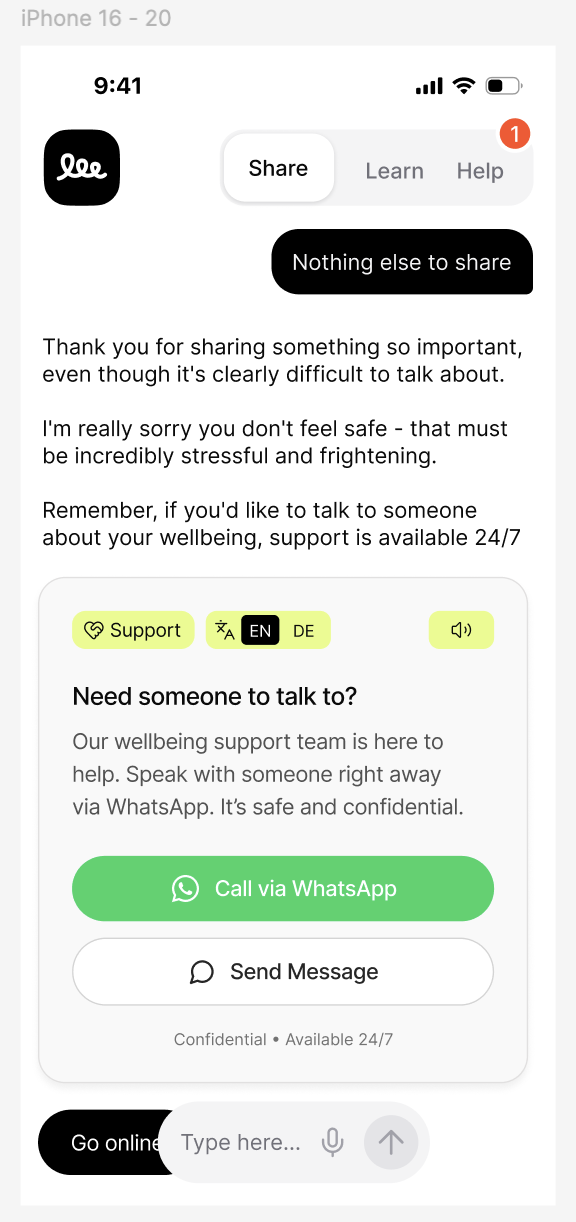
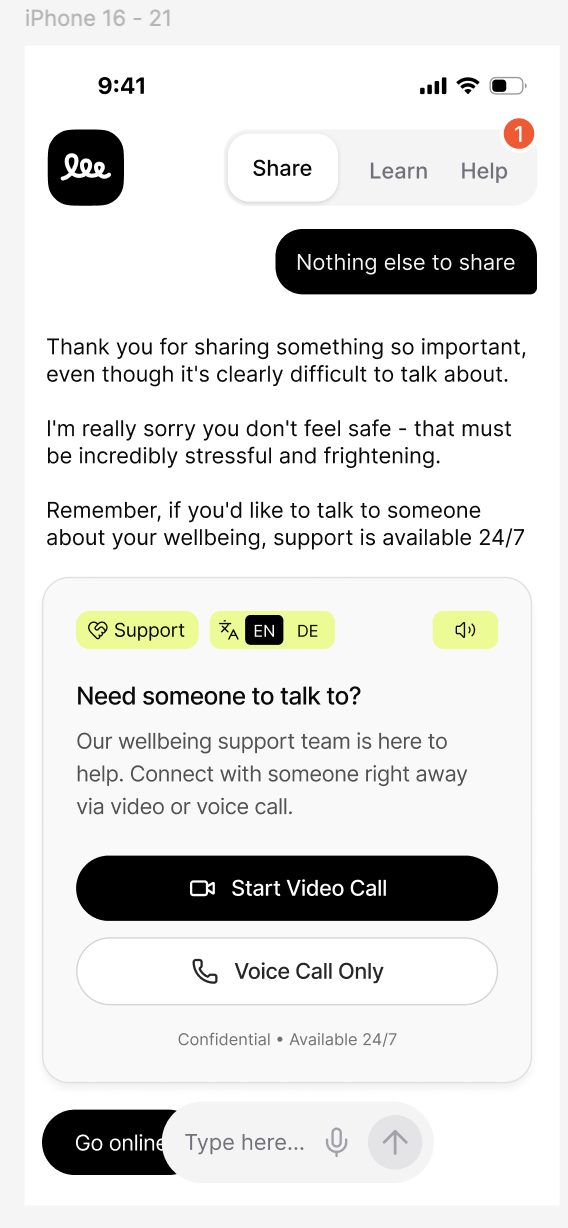
support prompt"] --> B{"Org support
channel setting?"} B -- "WhatsApp" --> WA["WhatsApp Card
📞 Call · 💬 Message"] B -- "Video/Voice" --> VC["Video Card
📹 Video · 📞 Voice"] WA --> WA1["Open wa.me link"] VC --> VC1["POST /calls/create-room
→ Daily.co"] style A fill:#D4FF00,stroke:#333,color:#000 style B fill:#f5f5f5,stroke:#555,color:#000 style WA fill:#25D366,stroke:#333,color:#fff style VC fill:#333,stroke:#000,color:#fff
4.2 Learn — Content Section
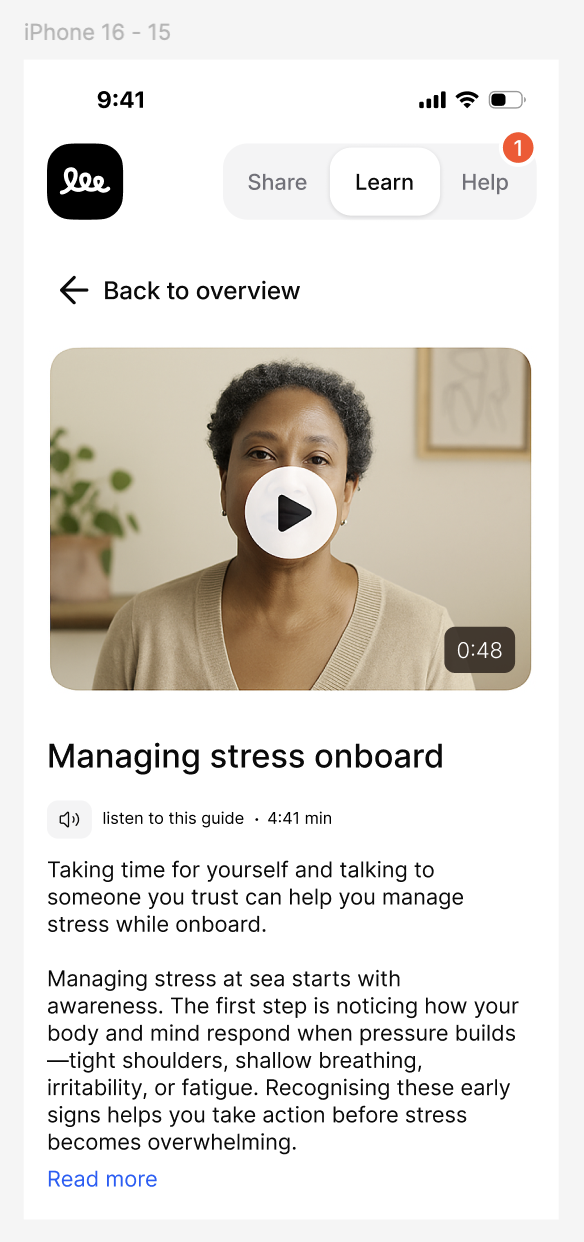
An entirely new section providing educational content for worker wellbeing, rights, safety, and culture.
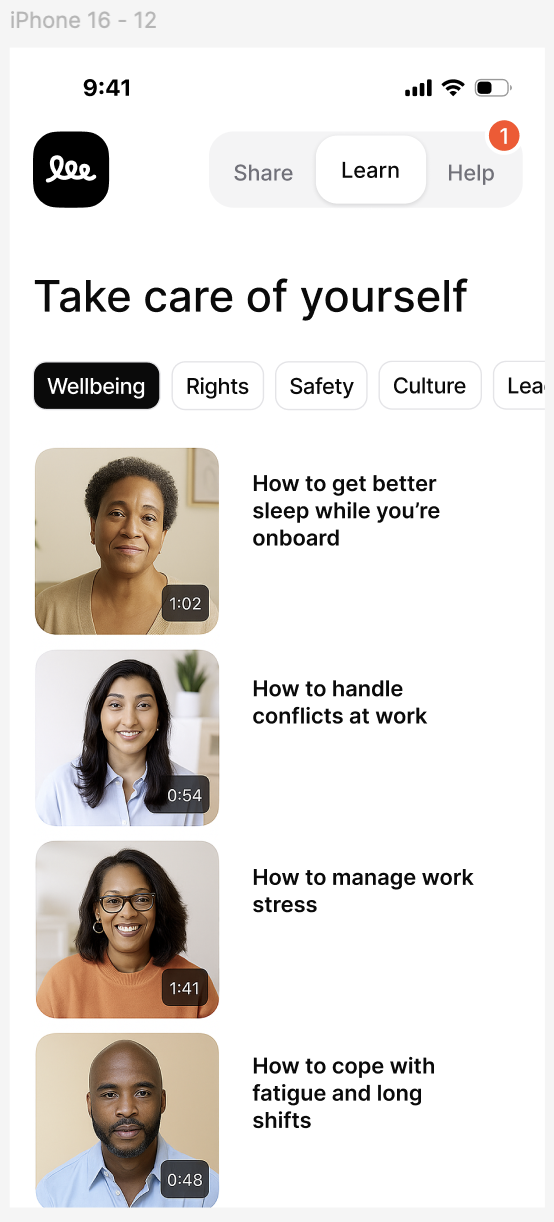
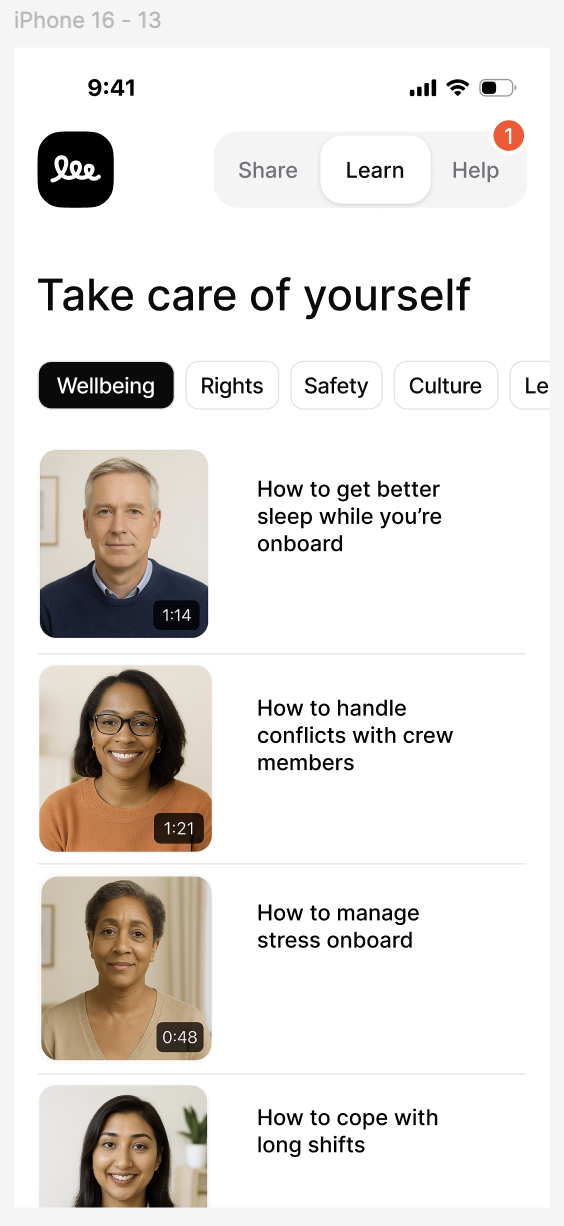
Content Listing
- Horizontal scrollable tab bar: Wellbeing | Rights | Safety | Culture | Leadership
- Cards with thumbnail, video duration badge, title
- Lazy-loaded images, sorted by position
Content Detail
- "← Back to overview" preserving selected category
- Full-width video player with play overlay
- "🔊 listen to this guide · 4:41 min" — audio narration uploaded by client
- Body text with "Read more" expand
- Respects language selector
4.3 Help — Support Section
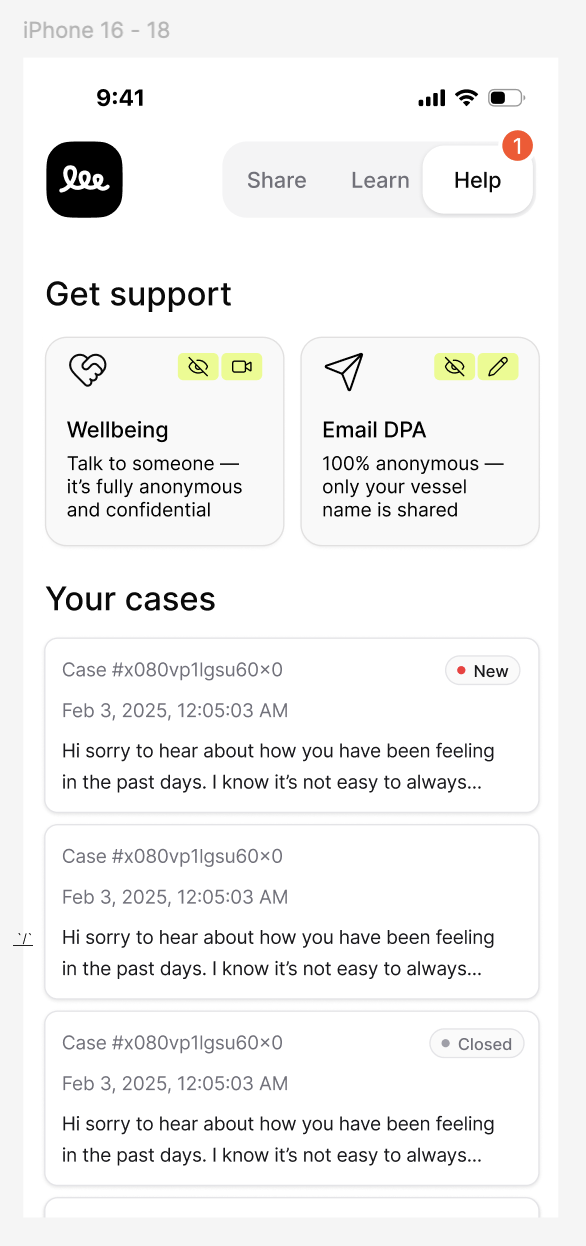
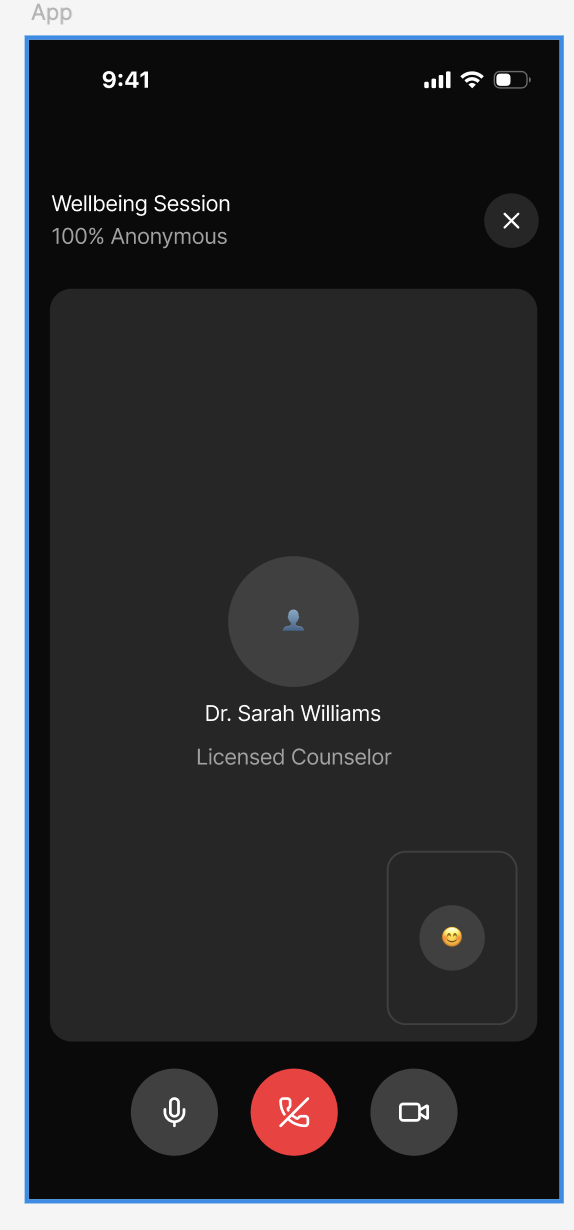
Direct support channels — live video/voice calls and anonymous email to DPA.
Help Landing
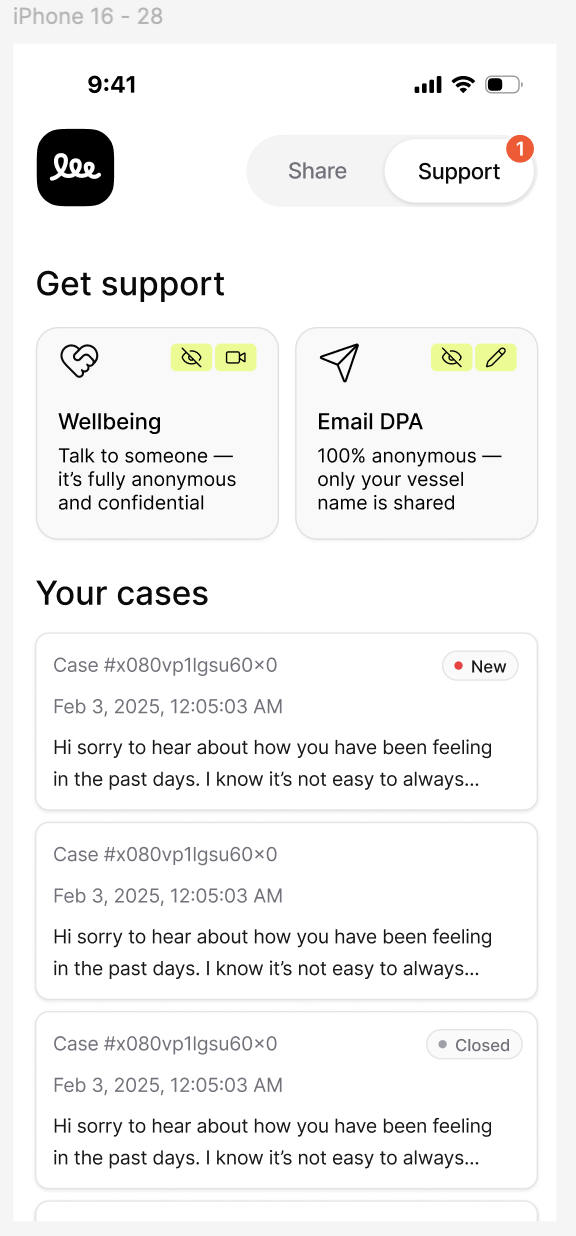
Two support channel cards: Wellbeing (video/voice call, anonymous) and Email DPA (anonymous, only vessel name shared). Below: "Your cases" list with status badges. Cases use the existing session/case infrastructure — no new data model needed. The Help tab notification badge derives from unread case count (cases with new counselor replies since last view).
Video/Voice Call (Daily.co)
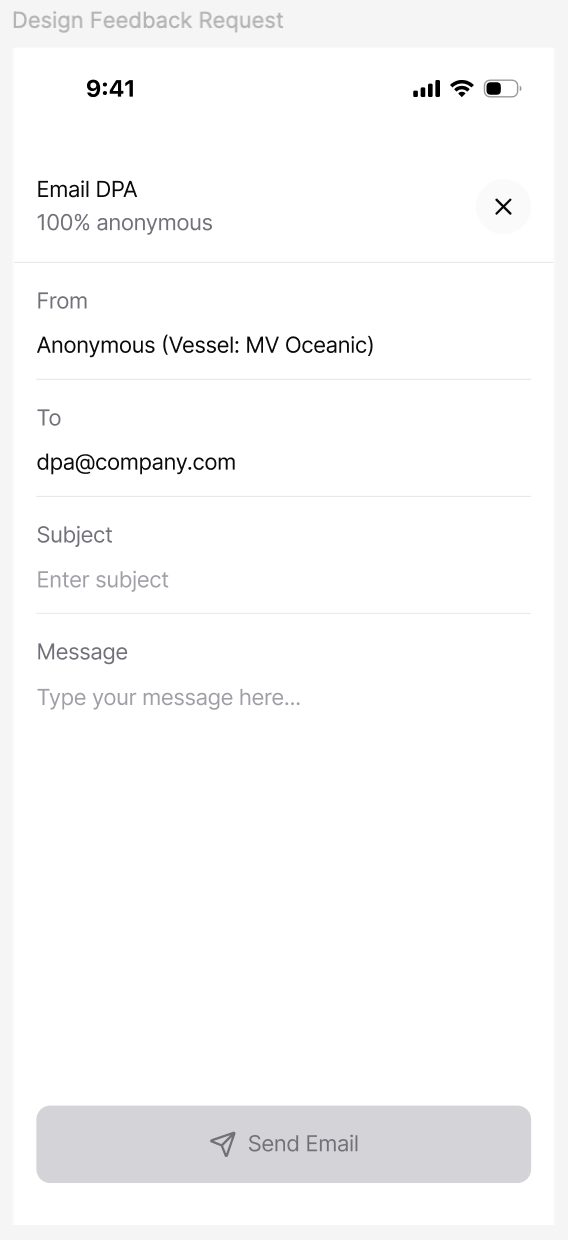
Anonymous Email to DPA
Pre-populated form: From: "Anonymous (Vessel: MV Oceanic)" → To: dpa@company.com. Worker fills Subject + Message. Sent via existing Resend integration.
4.4 Home Screen & Navigation
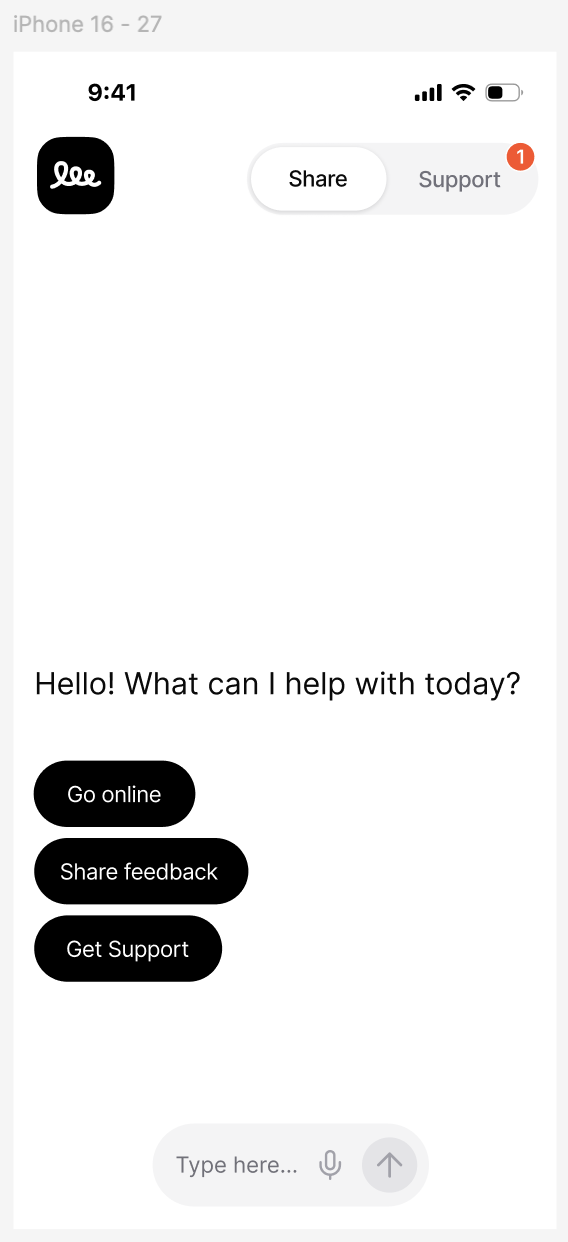
Free Feedback Option
"Share feedback" from the home screen starts a session flagged is_free_feedback: true. These responses are stored but excluded from all analytics — no sentiment scoring, heatmaps, risk analysis, or auto-escalation. Visible in the dashboard with a "Free Feedback" badge.
4.5 Escalation & Auto-Call System
When a conversation's AI risk analysis indicates high risk, the system automatically triggers escalation.
(summary + risk analysis)"] EQ --> AR["⚠️ analyzeRisk Queue
(risk_score 0.0–1.0)"] AR --> CHECK{"risk_score ≥
org threshold?
(default: 0.8)"} CHECK -- "No" --> LOG1["📝 Standard case"] CHECK -- "Yes" --> FF{"is_free_feedback?"} FF -- "Yes" --> LOG1 FF -- "No" --> QH{"Quiet hours?"} QH -- "Yes" --> DEFER["⏰ Defer"] QH -- "No" --> ESC["🚨 triggerEscalation"] DEFER --> ESC ESC --> NOTIFY["📧 Urgent email +
🔔 Push to support"] ESC --> ELOG["📋 escalation_log"] style SE fill:#D4FF00,stroke:#333,color:#000 style CHECK fill:#FF6B6B,stroke:#333,color:#fff style ESC fill:#FF4444,stroke:#333,color:#fff style NOTIFY fill:#333,stroke:#000,color:#fff
Configuration (per org, site-level overrides)
- Risk score threshold: 0.0–1.0 scale (0.0–0.2 low, 0.3–0.4 medium, 0.5–0.7 high, ≥0.8 critical). Escalation triggers at ≥ org threshold (default 0.8).
- Severity levels: which levels trigger escalation
- Phone numbers / contacts for support channel
- Quiet hours: defer to next window
4.6 Dashboard & Admin Enhancements
Provider Toggles
Per-organization feature flags stored in orgs.settings JSON, included in /new-session response. This JSON blob also stores escalation configuration (threshold, severity levels, quiet hours, contact numbers). Site-level fields (support_channel, dpa_email) live on the sites table for per-vessel override.
conditionally"] style DB fill:#333,stroke:#000,color:#fff style PWA fill:#D4FF00,stroke:#333,color:#000
Other Improvements
- Cleaner org switcher with logo
- Sites/departments in hierarchical tree with inline editing
- Quick-access site settings (WhatsApp, DPA email)
- Auto-call config UI: threshold slider, severity checkboxes, phone inputs, quiet hours, test button
4.7 Admin Content Management
+ File Uploads"] end CL -- "create / edit" --> CE CE -- "POST / PUT
+ file upload" --> API["⚡ /admin/content"] API -- "store metadata" --> DB[("💾 learn_content")] API -- "store files" --> S["💾 R2/S3"] DB -- "GET /content" --> PWA["📱 Learn tab"] style API fill:#333,stroke:#000,color:#fff style PWA fill:#D4FF00,stroke:#333,color:#000
- Full CRUD: title (multilingual), category, body text (multilingual), thumbnail upload, video URL, audio file upload, position, publish toggle
- All content (text, video, audio narrations) is provided by the client — the CMS is an upload/management tool, not a content generator
- Access scoped by org via existing
verifyOrgAccessmiddleware - Global content (cross-org) managed by super-admins only
4.8 Organization Context Enrichment
Admin-uploaded documents (PDFs, policy manuals, crew handbooks) that are automatically processed and injected as context into AI conversations for that organization's sessions, enriching AI responses with org-specific knowledge.
4.8.1 Organization Instructions
Custom instructions that augment the AI's system prompt for a specific organization. The survey_instructions table already exists in the production schema and is used in getSessionMessages(). This sprint improves the dashboard UI with template suggestions (e.g., "Focus on mental health topics", "Ask about safety concerns", "Be aware of cultural sensitivities for Filipino crew").
4.8.2 Org-Specific Documents
Admins upload documents via the dashboard. Text is extracted and chunked; relevant excerpts are included in the AI system prompt when generating responses for that org's sessions. Simple text injection is used for MVP — no vector database or semantic search.
- New table:
org_documents(id, org_id, name, file_url, extracted_text, chunk_count) - New routes:
POST /org/:id/documents,GET /org/:id/documents,DELETE /org/:id/documents/:docId - Text extraction via
pdf-parse; plain read for text files - Character limit per org to prevent prompt overflow (~8K chars)
- Dashboard: upload widget, document list with delete and preview of extracted text
- Access scoped by org via existing
verifyOrgAccessmiddleware
survey_instructions in getSessionMessages(). The heaviest lift is the text extraction pipeline and dashboard upload UI.
5. Data Model & API
New API Routes
| Method | Route | Auth | Description |
|---|---|---|---|
POST | /tts | Session | Generate TTS audio for text |
POST | /stt | Session | Transcribe audio to text |
GET | /content?category=&org_id= | Public | List published Learn content (filterable by category, org) |
GET | /content/:id | Public | Get single content item |
POST | /admin/content | Admin | Create content item |
PUT | /admin/content/:id | Admin | Update content item |
DELETE | /admin/content/:id | Admin | Delete content item |
POST | /calls/create-room | Session | Create Daily.co room |
POST | /calls/end | Session | End and log a call |
POST | /help/email-dpa | Session | Send anonymous email |
GET | /org/:id/settings | Admin | Get org feature settings |
PUT | /org/:id/settings | Admin | Update org feature settings |
GET | /org/:id/escalation-logs | Admin | List escalation history |
6. Third-Party Integrations
~$0.015–$0.030/1K"] OAI_W["🎤 Whisper
~$0.006/min"] DAILY_N["📹 Daily.co
200 free min/day"] MUX["🎬 Mux / CF Stream
~$0.007/min stored"] end API["⚡ scb-api"] --> OAI_CHAT & RESEND_E & FP_E & WP & OAI_TTS & OAI_W & DAILY_N & MUX style API fill:#333,stroke:#000,color:#fff style OAI_CHAT fill:#10a37f,stroke:#333,color:#fff style OAI_TTS fill:#10a37f,stroke:#333,color:#fff style OAI_W fill:#10a37f,stroke:#333,color:#fff style DAILY_N fill:#1BEBB9,stroke:#333,color:#000 style MUX fill:#6B46C1,stroke:#333,color:#fff
- Daily.co: Free tier supports up to 200 participant-minutes/day; paid plans for higher volume.
- OpenAI TTS:
tts-1-hdmodel at ~$0.015–$0.030/1K characters. - OpenAI Whisper: ~$0.006/min of audio.
- Mux / Cloudflare Stream: ~$0.007/min of video stored + streaming costs. Used for hosting Learn section video content with adaptive bitrate for low-bandwidth maritime environments.
- Resend: Generous free tier (100 emails/day); $20/mo for higher volume.
7. Design Reference — Two-Tab Variant
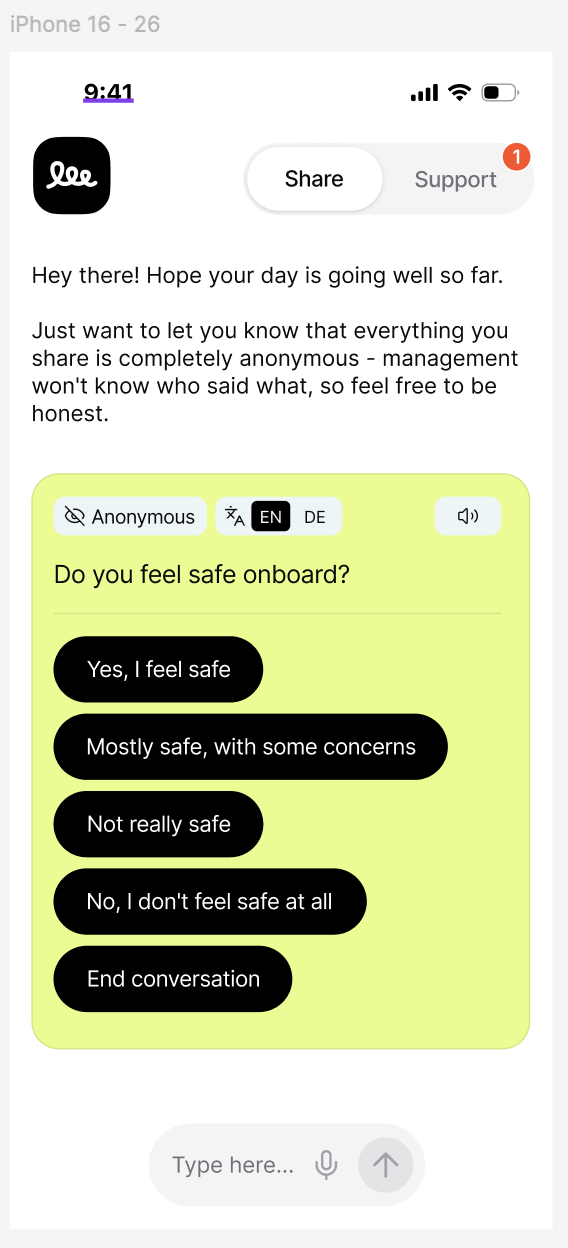
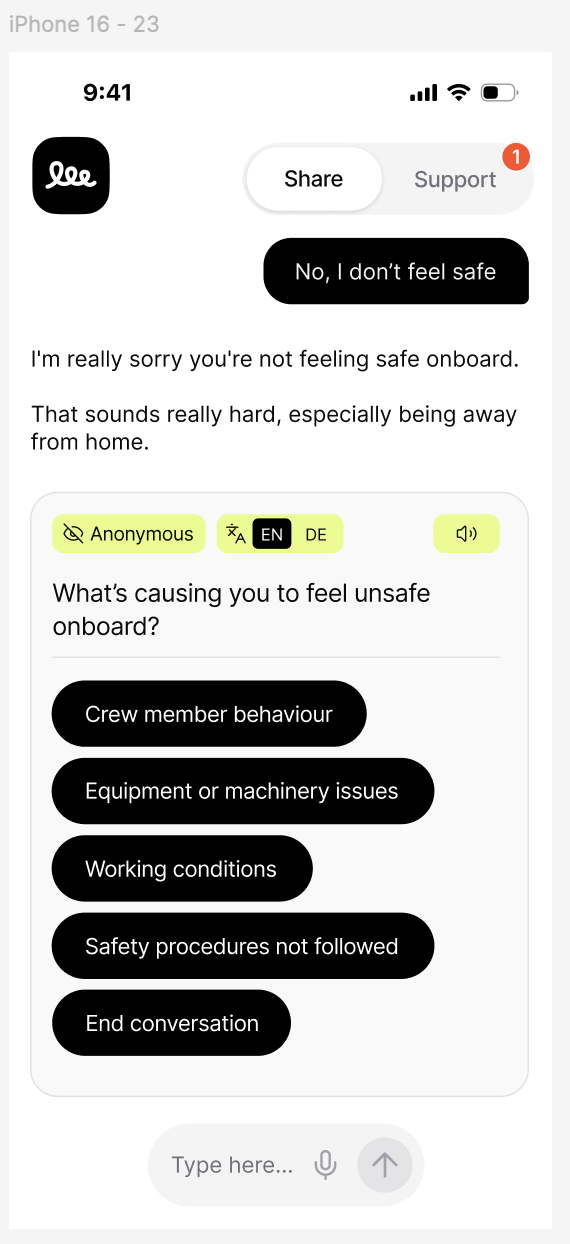
When Learn is disabled for an org, the app falls back to a two-tab layout (Share | Support). These screens show that variant. All other designs appear inline in their respective feature sections above.
8. Implementation Plan
9. Acceptance Criteria
Share (Chat)
- EN/DE language toggle switches question text and answer options between English and German in real-time; previously answered messages remain in their original language
- Speaker icon generates and plays TTS audio for any question
- Microphone icon activates voice input; transcribed text appears in input
- Question cards display with lime-green background, Anonymous badge, dark pill options
- Support card variant switches based on organization's support channel setting
- WhatsApp-enabled orgs see "Call via WhatsApp" + "Send Message" options; video-enabled orgs see Daily.co call options
Learn
- Content listing with category tabs, thumbnails, and video duration
- Content detail view plays video and renders body text
- "Listen to this guide" plays client-uploaded audio narration
- Content respects selected language
Help
- Help landing shows support channels and existing cases
- Video call connects worker anonymously to Daily.co room
- Voice-only call works with camera disabled
- Email DPA form sends anonymous email with correct From/To
Navigation & Home
- Three-tab layout on all mobile viewports; two-tab fallback when Learn disabled
- Home screen shows "Go online", "Share feedback", "Get Support"
- Notification badge on Help tab reflects unread count
- Free feedback sessions are stored but excluded from analytics, risk scoring, and escalation; visible in dashboard with "Free Feedback" badge
Escalation & Admin
- Auto-escalation triggers when risk score ≥ org threshold
- Escalation logs viewable in dashboard
- Content CMS: full CRUD of Learn items with file uploads
- Provider toggles enable/disable features per org
- Site settings UI: support channel and DPA email editable per site
- Auto-call config UI: threshold slider, severity checkboxes, quiet hours, test button
- Org documents can be uploaded, listed, and deleted via the dashboard
- Uploaded document text is injected into the AI system prompt for that org's sessions (up to ~8K chars)
- Org instructions UI includes template suggestions for common prompt customizations
10. Out of Scope
- AI Fleet Analyst — email-first intelligence platform replacing the traditional dashboard with proactive briefings, conversational replies, and evidence cards (see separate spec)
- Two-way email relay — MVP is one-way (worker → DPA)
- Custom language packs — LLM handles all supported languages natively; UI caption translations added on demand
- Call recording — not recorded for privacy
- Native mobile app — PWA only
- Learn analytics — page views, completion rates are future
- Counselor-side interface — counselors use Daily.co directly
- Twilio phone automation — escalation is push + email for now
11. Project Terms
Fixed Project Fee
Includes all development, deployment, and testing across scb-q, scb-api, and scb.
Due prior to kickoff
Due prior to final handover
Terms & Conditions
- Fixed price covers full scope (sections 4.1–4.8)
- Additional requests billed at $200/hr or separate agreement
- Third-party service costs are the client's responsibility
- Deployment to existing Cloudflare Pages / server infrastructure
- Source code remains in the client's repository at all times
- One revision round included after staging. Additional rounds billed hourly.